The tools asked for one specific version of the code. They never checked whether that was the version they received.
When people worry about AI coding assistants, they usually worry about the AI part. Could someone trick the model? Hide an instruction in a file and talk it into doing something stupid?
Plugin4Shell has nothing to do with the AI. It broke somewhere far more ordinary: the moment the tool downloads an add-on and decides the code is safe to run.
Four popular tools had the same flaw at the same time — Claude Code, OpenAI Codex, GitHub Copilot and the Gemini CLI. In every one of them, the missing piece was a single comparison.
First, what the safety measure was supposed to do
Add-ons, or plugins, give these tools extra abilities. They are real code, and they run on your machine with your permissions.
They also come from repositories that other people control. That is a lot of trust to place in a stranger, so the industry has a standard way of managing it: pin the exact version.
Every version of code in git has a fingerprint — a long string of letters and numbers calculated from the code itself. Change a single character anywhere and the fingerprint changes too. Nobody can edit a version and keep its old fingerprint. That is the whole point of it.
So the plan is simple. Somebody reviews version X, writes down its fingerprint, and the tool always asks for that fingerprint. Even if the author later uploads something malicious, the tool keeps fetching the reviewed version.
It is a good plan. It just was not what the tools were doing.
Step 1: Somebody takes over the add-on
One thing to be clear about up front, because it limits who can pull this off: the attacker needs control of the add-on's repository.
That is not a high bar. Projects change hands. Accounts get taken over. A maintainer gets bored and hands the keys to a friendly volunteer. Small useful plugins get quietly bought. But it does mean a random stranger on the internet cannot do this. The person who publishes the add-on can, any time they like.
Step 2: A label that looks like a fingerprint
Think about a library. Every book has a unique catalogue number printed inside it. Now imagine somebody sticks a label on the spine of a completely different book, and writes that same catalogue number on the label.
Ask the librarian for "the book labelled 4471" and you are handed the wrong book. Open the cover and check the number printed inside, and you catch it immediately.
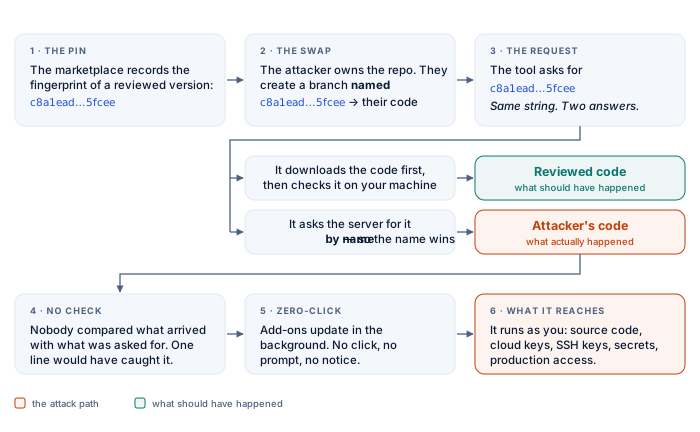
Git has exactly this problem. Fingerprints are one thing. Branch names — labels you stick on versions — are another. And git does not stop you from using a fingerprint as a label. So the attacker creates a branch whose name is the pinned fingerprint, character for character, and points it at their own code:
# the fingerprint of the reviewed version
c8a1ead203b6f95f4609e7269c7b76f3af35fcee

# a BRANCH NAMED as that fingerprint,
# pointing at the attacker's code instead
$ git branch c8a1ead2...5fcee attacker-code
Two different things in the repository now answer to the same name. One is the reviewed code. One is the attacker's. Which one you get depends on how you ask.
Step 3: Ask the wrong way, get the wrong code
There is more than one way to ask git for a version, and they do not all behave the same.
If you ask your own computer, which already holds the code, git treats the string as a fingerprint and gives you the right version. If you ask the remote server, git treats it as a label — because in that part of the conversation, a label is what the server expects. The attacker's label wins.
Asking the server for it by name
  -> attacker's code

Downloading it, then checking it out locally
  -> reviewed code
The tools asked the server. They got the attacker's code, with no warning of any kind. The command looked correct. The fingerprint in the logs looked correct. The files on disk belonged to somebody else.
Step 4: The one line that would have caught it
This is the part that stings. Once the download finished, the tool was sitting in a folder full of code, and the answer was one command away. Ask what you actually got, and compare it to what you asked for:
# what we asked for
WANTED=c8a1ead2...5fcee

# what we actually got
GOT=$(git rev-parse HEAD)

# do they match?
[ "$GOT" = "$WANTED" ] || exit 1
None of the four tools ran that check. Pinning was treated as something that simply could not go wrong, so nobody built anything to notice when it did. The fingerprint was used to request the code and then thrown away, never used to confirm it.
Step 5: It arrives while you are not looking
A supply-chain problem that needs you to reinstall something is a slow problem. This one needed nothing from you at all.
Claude Code and Codex quietly update installed add-ons in the background. You do not click anything. You are not asked. You are not told. If the attacker has their fake label ready, the swap happens on its own, on a machine whose owner never looked.
That is what "zero-click" means, and it is why researchers called this the first genuine supply-chain flaw of the AI agent world rather than an interesting edge case.
Step 6: What the add-on can reach
Running code only matters as much as what that code can touch. An add-on runs as you — not in a sandbox, not as a limited service account. You. Which usually means it can reach:
- the project you have open, and every other project on the disk
- cloud passwords and keys sitting in your environment or config files
- your SSH keys, and the internal servers they open
- tokens for private repositories and package registries
- any production system you personally have access to
- the secrets in every .env file on the machine
So one bad add-on lands on a machine that is, by design, one of the best-connected computers in the company.
How it was found, and what each vendor did
The AIR Security research lab found the flaw in May 2026, with working demonstrations against all four tools. They reported it to the vendors the following month and published in September. No CVE number had been issued by the time it went public.
The four responses are worth putting side by side, because they are four genuinely different decisions about the same bug:
- Claude Code — fixed in version 2.1.179
- OpenAI Codex — fixed in version 0.146.0
- GitHub Copilot — not fixed. GitHub argues that its own naming rules make the trick harder on repositories it hosts
- Gemini CLI — not fixed. Google retired the tool and pointed users at its replacement
GitHub's argument holds up as far as it goes. It says nothing about add-ons hosted on company-run git servers or other platforms, where those naming rules do not exist. And retiring a product does not help anyone who has not moved off it yet.
Why this one is worth your attention
Nothing was injected into a prompt. No model was jailbroken. No password was stolen. The tools did exactly what they were built to do, and what they were built to do was quietly wrong in a place nobody thought to look — because pinning is the thing you do so that you can stop thinking about it.
A fingerprint tells you what the code is. A label only tells you what somebody called it. The tools asked for a fingerprint and accepted a label.
This shape keeps turning up. A platform that treats a settings file as harmless and then runs it. A login token meant for one product that a second product happily accepts. A tool that downloads a version and never checks which one arrived. Every time, the clever AI is beside the point, and the plumbing decides what happens.
What to do about it
- 01Update your tools. Claude Code 2.1.179 or newer, Codex 0.146.0 or newer.
- 02List the add-ons you have installed and check who owns each one. Those people can run code on your machine.
- 03Treat add-ons hosted outside the big platforms as riskier, since the naming rules GitHub relies on may not apply there.
- 04Turn off automatic add-on updates if your tool lets you, so a new version is something a person actually sees.
- 05If you build anything that installs a pinned version, check what you got against what you asked for, and stop if they differ.
- 06Give these tools less to reach. Assume that one day something in your development environment will run code you never read, and keep your keys and access scoped accordingly.
That last one is the only lasting protection. Pinning will get fixed. Sooner or later something else between an add-on author and your machine will turn out to be trusted on the strength of a name. What decides how bad that day is, is how much access was lying around within reach.